Showing posts with label Tools. Show all posts

Saturday, April 16, 2011

Upload and Share Files on Twitter : TwileShare

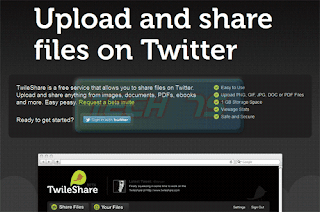
 Twitter is being used by many, and many faces a problem of sharing any file on Twitter. You can tweet, share links and your thoughts but not file. TwileShare another application that can make the use of Twitter better. You can share your pics, docs or pdf files on Twitter via Twilrshare


Saturday, March 12, 2011

Find you FB friends on Google Maps

Want to see from where all you have friends on Facebook? Wheremyfriends is an  interesting application that will actually tell you the geographical location of all your friends on FB using Google Maps.


Wednesday, February 9, 2011

Access Facebook from Gmail

Gmail is one of the favorite email service used and Facebook the popular social networking site. If they tend to combine that would be an excellent experience to access both Facebook and Gmail in one window. So now when you will open Gmail to check your mails then you can check the wall posts, news feeds and the status updates of your Facebook profile.

Keyboard Shortcuts for Facebook

Facebook is one of the biggest social networking site and every one using internet has there account on Facebook. You can speed up you Facebook experience by using keyboard shortcut and thus saving a lot of your time.Keyboard shortcuts for Facebook are depending upon the type of browser you are using and therefore have different  modifier key.


Tuesday, December 21, 2010

The Facebook Newspaper-PostPost

Do you want to see your news feed  in Facebook in a new ? Well then try out PostPost. PostPost is a web application that reformat your Facebook news feed in the form of  newspaper.
PostPost take your Facebook news feed, photos & videos in the news feeds and  presents it in a way that is more manageable.


Monday, December 20, 2010

Adding Quick Launch to Windows 7 Taskbar

The Quick launch feature in windows XP is the most used feature. Windows 7 has added a lot of new feature to the taskbar of Windows 7. In windows 7 , by default the Quick launch is hidden.

Enabling Quick launch

Tuesday, December 7, 2010

Play or Share Youtube videos at a certain point

 Many of you play and share various videos on you tube. But can you share a video that start at a particular time or you want to share the most interesting part of the video without wasting any time?
Well now you can share a video that you want people should it from that time onwards. You tube URL support time parameter that let you play any video at any specific time.


Speak in any foreign language using Google Tanslate

 Today every one wants to speak 2 or more languages, but they don't have the time to go to an institution or school to learn them. Now with the help of Google Translate you can not even translate the text but also learn how to speak.


Wednesday, November 17, 2010

See an Instant preview of your Google Search Result

 Many times you tend to forget the name of a very good website but you have an image of the site in you mind. Keeping that in mind Google has come up with this cool feature of Instant Preview.

Tuesday, November 16, 2010

Listen to Youtube Songs with Quisple

Many times it happens that you want to listen to a songs that you don't have. You then search it on net, and finds that it is available on Youtube.Now you open Youtube every time you wanna listen to that song.  So how to play that song on desktop?

Friday, August 20, 2010

See the preview of page in Google Search Result

Many time you visit a site, you might not remember the name but you always remember how the site looks. For this purpose Google has added a new feature in its search option, using which you can have a preview of the iste in the Google search results.

Sunday, August 8, 2010

NuCaptcha: A motion Captcha

Many time when you want to leave a comment on a site or register for a site it asks for a captcha for security and many time it showed error that you entered a wrong captcha. You had to fill up with screwed up words to continue.And this leads to lose of traffic as the visitors feel annoyed by this thing.


Saturday, August 7, 2010

Share Files and Text using Write.fm

When you want to share a file or something what you do? You first zip the file and then upload the zip file to some free hosting site and then give the link to your friend. This is what many of you do(include me also). But is there a simple way to do that?


Write.fm is one of those service that let us share files or text in a simple way, reducing our work to minimum. This is a like a joint venture between file sharing, cloud based notepad and URL Shortener. Yes, you heard it right.
When you open write.fm, you will see a text input field, shortened URL and add file icon that lets you add/attach any file to the page. You can also rename it and that will be its shortened URL[via Mashable]


Thanks for Stopping by Tech75. You can leave a comment to let me know your feedback and can also subscribe to the RSS feeds for regular updates.

Sunday, August 1, 2010

How to Create a strong Password

There are ways in which you can create a strong passwords. People usually make some mistakes while choosing a password.


Creating a Strong Password


1. Use special Characters like @,#,$,% etc in your password.
2. Add complexity to your password by mixing uppercase, lowercase and special characters all together.
3. Use of Password Checker to check the strength of your password.
4. Most important keep your password a secret.
5. The length of the password should be at least 14 characters.

If you follow these steps then you can make a password that is quite strong for your accounts.

Thanks for Stopping by Tech75. You can leave a comment to let me know your feedback and can also subscribe to the RSS feeds for regular updates.

Check the Strength of your Passwords Online

You think many time what to keep passwords for your email accounts so that they don't get hacked by professionals. Now Microsoft has launched tool with which you can check the strength of your password online.

Microsoft Password Checker is an free online tool which will help you calculate the strength of you password, whether it is good enough.


The strength of you password depends upon the different types of character that you have used in your password. You should try to use a password that has a minimum of 14 characters in your password.

Thanks for Stopping by Tech75. You can leave a comment to let me know your feedback and can also subscribe to the RSS feeds for regular updates.

Tuesday, July 27, 2010

Arrange Bookmarks in Firefox the smartest way

Not enough place on your bookmarks bar in Firefox browser? Smart Bookmarks Bar extension comes handy right here by hiding bookmarks names and only showing icons allowing the Bookmark names to be displayed on mouse roll over.

Smart Bookmarks Bar addon in Firefox

1. Install the Smart Bookmarks Bar extension from Firefox addon page.


2. Restart the Firefox and you will find all you bookmarks arranged without being hotch-potch inside the Bookmarks toolbar.

Now you can roll over your mouse on a particular bookmark icon to display its name and remove the extra clutter of bookmark tabs being shown in the Firefox Bookmarks toolbar with this handy extension.


Thanks for Stopping by Tech75. You can leave a comment to let me know your feedback and can also subscribe to the RSS feeds for regular updates.
Related Posts with Thumbnails

Categories

Top Internet blogs

Pages

Subscribe @ Techphilia

Enter your email address:

Delivered by FeedBurner

Pages

Indulge in Techphilia

 Techno Galaxy with some tips and tricks and latest offering from Internet

Latest @ TechPhilia