Showing posts with label Windows XP. Show all posts

Thursday, June 16, 2011

Create Shortcut to Shutdown/Restart PC

Normally it takes a hell lot of time just Shutting down Windows, you have to move your mouse to the Start Button, click on it, move it again over Shut Down, click, then move it over the necessary option and click, then move the cursor over the OK button and once again (you guessed it) click.This whole process can be shortened by creating shortcuts on the Desktop which will shut down Windows at the click of a button.


Wednesday, June 15, 2011

How to Rename Recycle Bin ?

Have you ever tried renaming Recycle Bin ? You will notice that you there is no option to rename it. But nothing is impossible.You can easily rename the recycle bin just following a few simple steps.


Tuesday, July 27, 2010

Check whether you have a 32-Bit or 64-Bit Processor in your PC

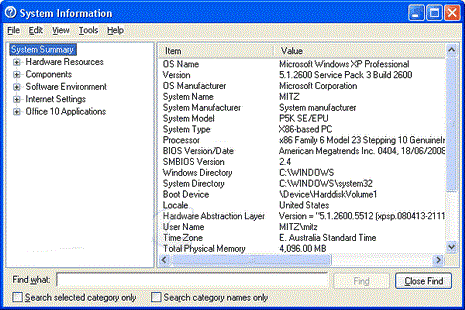
Sometimes you get into a dilemma of choosing some file to install whether it supports 32-Bit or 64-Bit processor version. Before downloading some driver for your hardware or OS, check out your system configuration as below:

In Windows XP:

1. Click on Start.
2. Choose All programs.
3. Now click accessories, then system tools.
4. Now choose System information.


If the processor mentioned is x86 then you have a 32 bit processor. If its mentioned x64 Edition Version then this means it is a 64 bit operating system.

For Windows 7:


Now before downloading any software or driver, check the platform and system information for absolute compatibility of software with operating system and processor.

Thanks for Stopping by Tech75. You can leave a comment to let me know your feedback and can also subscribe to the RSS feeds for regular updates.
Related Posts with Thumbnails

Categories

Top Internet blogs

Pages

Subscribe @ Techphilia

Enter your email address:

Delivered by FeedBurner

Pages

Indulge in Techphilia

 Techno Galaxy with some tips and tricks and latest offering from Internet

Latest @ TechPhilia