Most of the time you have to search the internet for the lyrics of your favorite songs, sometime you are successful in searching it and sometime you dont find the lyrics of the song. Using MiniLyrics software you dont have to search for the lyrics, this will automatically display the lyrics of the song you are playing.
Showing posts with label Software. Show all posts
Thursday, June 16, 2011
Thursday, April 14, 2011
How to use VLC as Screen Recording Tool
VLC media player is such a tool for media option that plays almost every file that you open on it. Not only it plays videos , it can also record videos. You can easily use VLC media player as a screen recording tool. There are many software on the internet that can do such kind of job, but you can use it if you need a quick recording.
Tuesday, April 12, 2011
How to delete Chat and Call History in Skype
Skype is used by people all over the world for video calling, calling to a mobile or chatting. Skype keeps a record of all the calls made, received and the chat messages. You can easily delete the call history of Skype and also change the time period in which the chat history is kept.
Delete History in Skype
1. Log in to your Skype account.
2. Click on Tools & Options.
Delete History in Skype
1. Log in to your Skype account.
2. Click on Tools & Options.
Monday, April 11, 2011
Prevent IDM from Downloading using Special keys
IDM has options or keys that can prevent it from downloading a file. These keys are called the Special keys. With the help of this key you can prevent IDM from downloading a file and instead the normal browser will download the file. By default ALT key is used to prevent the download.
Download file using IDM
People prefer IDM for downloading any thing whether it's a software, song , video or some document. IDM tends to give you more speed than regular download. With the help of IDM, it will automatically detects and starts downloading a file, depending upon the format mentioned in its database.
Tuesday, April 6, 2010
Free Download Y-Browser for N73
Now, if you have phone memory full without any major data saved by you in phone memory, Y-Browser is one of the tools that can help you..
DOWNLOAD LINK
If in case it happens to be expired certificate, Simple solution to it is that just set your phone date to Jan1,2007 and then install.After completing the installation, simply update your date to current date.
Saturday, March 13, 2010
How to Free phone memory in N73 ?
Sometimes,your phone N73 may show phone memory full,even when you dont have any images,videos or text in phone memory.You can check your memory status Gallery-->options-->memory status.
We have two solutions for this problem :
1)Just Install Y Browser
Open C/Data/Lifeblog/Database --- In this Folder u will find that file (Lifeblog.db).. Try Deleting It Normally and it says The FIle is in Use..
Now Go Back..
Just Rename That Database Folder.
Select Database-->Options-->File-->Rename
Just give it any name..
Here U r Done..!! Now u can go inside that folder and delete that crappy file Lifeblog.db!
2) Your cell may not even support installing Y-Browser due to insufficient memory space. Now simply follow these steps:
1.Change ur message memory frm Phone memory to Memory card.
2.Then Remove ur Memory card.
B4 removing copy ur phone memory images n ur imp data into memory card..
3.Go in Lifeblog application and open it.
4.Press Right Nevigation key n select mark all
5.Then Delet all files...(it will take time)
6.Hence it wil make ur Phone Memory Free..
7.Now restart ur Cell
8.On ur Cell n insert memory card in it
9.Chk the status of Phone memory..
10.It wil b free
These both solutions are tested and works fine.I have tested on my N73 several times.
We have two solutions for this problem :
1)Just Install Y Browser
Open C/Data/Lifeblog/Database --- In this Folder u will find that file (Lifeblog.db).. Try Deleting It Normally and it says The FIle is in Use..
Now Go Back..
Just Rename That Database Folder.
Select Database-->Options-->File-->Rename
Just give it any name..
Here U r Done..!! Now u can go inside that folder and delete that crappy file Lifeblog.db!
2) Your cell may not even support installing Y-Browser due to insufficient memory space. Now simply follow these steps:
1.Change ur message memory frm Phone memory to Memory card.
2.Then Remove ur Memory card.
B4 removing copy ur phone memory images n ur imp data into memory card..
3.Go in Lifeblog application and open it.
4.Press Right Nevigation key n select mark all
5.Then Delet all files...(it will take time)
6.Hence it wil make ur Phone Memory Free..
7.Now restart ur Cell
8.On ur Cell n insert memory card in it
9.Chk the status of Phone memory..
10.It wil b free
These both solutions are tested and works fine.I have tested on my N73 several times.
Tuesday, January 26, 2010
Access Control for Application AppLocker
With AppLocker, you can restrict other to have an access to your files.
1. Click on Start & type Gpedit.msc
2. Go to Computer Configuration > Window setting > Security Setting > Application Control Policies > Applocker
3.Right Click on ony one option(Executable, Installer, or script) and create a new rule.
After this your files, documents and folders are safe as now no one can access it without your permission.
Thursday, January 21, 2010
Resize image in Window 7 with Powertoy
Looking for a simple tool to handle all resizing actions of digital images in Windows 7? Here is a very simple and easy method to resize an image in window 7 and i.e Powertoy Clone.
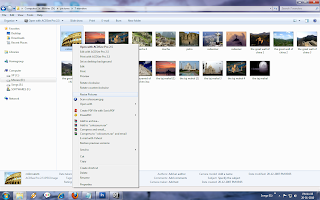
Image Resizer Powertoy Clone for Windows is set up to integrate seamless with the operating system’s graphical user interface. In this regard, users will be able to easily access the Powertoy via Windows Explorer, namely right-clicking on an image and selecting the Resize Pictures option from a menu that will pop up.

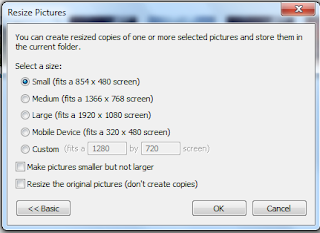
The Powertoy delivers batch resize capabilities, it can handle multiple images at a time. The tool permits users to create copies of the pictures resized and to store them in the same folder as the original images.
There are four default sizes for the image:

1. Small – 640x480 pixels,
2. Medium - 800x600 pixels,
3. Large 1024x768pixels,
4. Handheld 240x320pixels.
This is not all, Image Resizer Powertoy Clone.for Windows 7 also comes with Advanced options, in wich a user can enter their own custom size.
In this,all the editing will be done o the original one and no other copy will be created.
Did you enjoy the post???
Why don't you leave a comment or subscribe to the RSS feed or receive the latest information delivered to your mail.
Image Resizer Powertoy Clone for Windows is set up to integrate seamless with the operating system’s graphical user interface. In this regard, users will be able to easily access the Powertoy via Windows Explorer, namely right-clicking on an image and selecting the Resize Pictures option from a menu that will pop up.

The Powertoy delivers batch resize capabilities, it can handle multiple images at a time. The tool permits users to create copies of the pictures resized and to store them in the same folder as the original images.
There are four default sizes for the image:

1. Small – 640x480 pixels,
2. Medium - 800x600 pixels,
3. Large 1024x768pixels,
4. Handheld 240x320pixels.
This is not all, Image Resizer Powertoy Clone.for Windows 7 also comes with Advanced options, in wich a user can enter their own custom size.
In this,all the editing will be done o the original one and no other copy will be created.
Did you enjoy the post???
Why don't you leave a comment or subscribe to the RSS feed or receive the latest information delivered to your mail.
Sunday, January 17, 2010
Connect with Twitter Facebook on Tweetdeck
Tweetdeck is an Adobe Air desktop application used to access Twitter.TweetDeck is your personal browser for staying in touch with what’s happening now, connecting you with your contacts across Twitter, Facebook, MySpace, LinkedIn and more.
To download Tweetdeck click Tweetdeck
Did you enjoy the post???
Why don't you leave a comment or subscribe to the RSS feed or receive the latest information delivered to your mail.

Tweetdeck is available for the Windows and MAC operating systems.TweetDeck users can now organize their friends on Facebook into smaller groups, view photos, videos, links, wall posts and more in TweetDeck.Just a few clicks, and you can write on your Facebook wall, comment and make update Pages directly from TweetDeck.
To download Tweetdeck click Tweetdeck
Did you enjoy the post???
Why don't you leave a comment or subscribe to the RSS feed or receive the latest information delivered to your mail.
Thursday, December 24, 2009
Recovering the Deleted data
Many times this thing happens that you accidentally delete some of your important data permanently. What you do in that case?
Either download that data again or if you were doing it on office that you have to do it again.
There is one another way to save time and that is to recover the lost data. This can be done with the help of some software.

One of the software with which you can recover the lost data is by using recuva software. This software can recover data form your PC, MP3 players or Digital cameras.
With the help of recuva you can restore any type of deleted data.
It can also restore your unsaved word document.
You can download this software form Recuva
Did you enjoy the post???
Why don't you leave a comment or subscribe to the RSS feed or receive the latest information delivered to your mail.
Either download that data again or if you were doing it on office that you have to do it again.
There is one another way to save time and that is to recover the lost data. This can be done with the help of some software.

One of the software with which you can recover the lost data is by using recuva software. This software can recover data form your PC, MP3 players or Digital cameras.
With the help of recuva you can restore any type of deleted data.
It can also restore your unsaved word document.
You can download this software form Recuva
Did you enjoy the post???
Why don't you leave a comment or subscribe to the RSS feed or receive the latest information delivered to your mail.
Subscribe to:
Posts (Atom)
Categories
- Amazon (1)
- Android (4)
- Apple (9)
- Attachments (1)
- Barnes n Noble (1)
- Blackberry (5)
- Bookmarks (2)
- books (1)
- Chat (2)
- Dell (5)
- Dictionary (1)
- Drag-and-drop (1)
- e-book reader (3)
- Edit (4)
- Email (2)
- Extensions (5)
- Facebook (12)
- File compression (1)
- Firefox (2)
- Gadgets (52)
- Gmail (11)
- Google (35)
- Google Chrome (8)
- Google Labs (2)
- Hardware (1)
- Hauwei (1)
- Hewlett Packard (3)
- Hotmail (1)
- HTC (5)
- HTML5 (1)
- Interesting (13)
- internet (36)
- Internet Explorer (10)
- iPhone 5 (1)
- Keyboard (7)
- Lenovo (2)
- LG (2)
- Live Video (2)
- Login (3)
- mail (2)
- Micromax (2)
- Microsoft Word (1)
- mobile world (78)
- Motorola (8)
- Mozilla Firefox (7)
- Nokia (20)
- Olive (2)
- Opera (1)
- Ovi (2)
- Password (1)
- PC (32)
- Safari (1)
- Samsung (5)
- Security (4)
- Servers (2)
- Sharp (1)
- Social Application (3)
- Social Gaming (1)
- Software (11)
- Softwares (2)
- Sony Ericsson (4)
- Symbian (3)
- Symbian Anna (1)
- Tablet (4)
- TAG heuer (2)
- Templates (1)
- Themes (3)
- TIPS (104)
- Tools (16)
- TouchScreen (23)
- Tricks (61)
- Twitter (2)
- Video (3)
- Web (2)
- Web browser (7)
- Windows 7 (26)
- Windows XP (3)
- yahoo (1)
- youtube (4)